I must say that most people don’t know how to check the owner’s name in Dharani (Now Bhubharati Portal).
So, don’t worry, I will explain to you clearly, step by step.
🔔 Important Update: Dharani Is Now Bhubharati
You should know that earlier, Telangana land records were available on Dharani.
Now, the government has launched a new and improved portal called Bhubharati.
- 👉 Dharani’s website is no longer working
- 👉 All land records are now shifted to Bhubharati
But don’t worry 😊 Process is the same and easy to use.
Table of Contents
What Is Dharani / Bhubharati in Simple Words?
You can think of Bhubharati like a digital land notebook 📘
It shows:
- Owner’s name
- Survey number
- Land size
- Village & Mandal
- Pattadar details
You know that earlier, this work was done in the Mandal offices. Now you can check it online from home.
You should read this about the sale deed.
How to Check the Owner’s Name in Dharani (Bhubharati Portal)
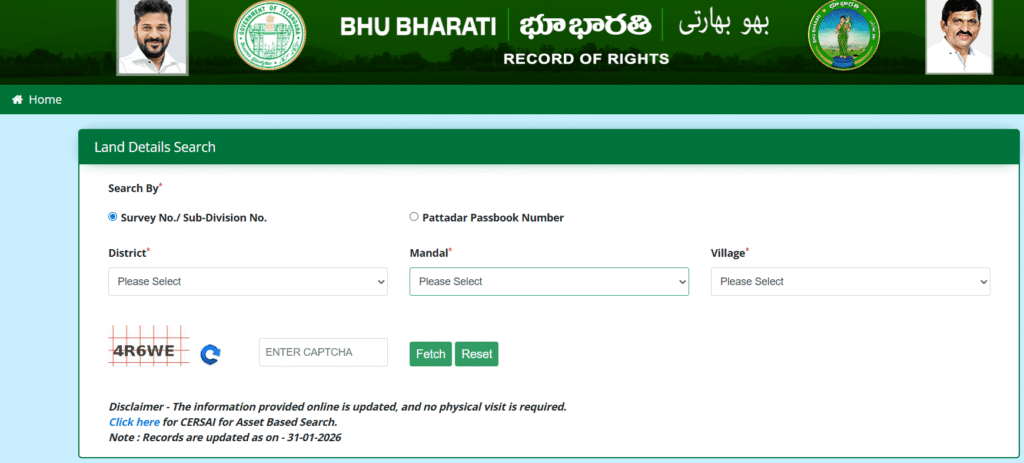
Step 1: Open the Bhubharati Land Details Page
- Open Google
- Search for “Bhubharati Telangana Land Records”
- Open the official Bhubharati website
- Click on “Land Details Search”
Step 2: Select “Search By” Option
At the top, you will see Search By* with two options:
- Survey No. / Sub-Division No. (Selected by default)
- Pattadar Passbook Number
👉 Best option: You can choose Survey No. / Sub-Division No. (This works for most users)
Step 3: Select District
- You can click on the District* dropdown
- You can choose your district name
📌 Example: Rangareddy / Medchal / Sangareddy / Yadadri, etc.
Select carefully. Wrong district = no data.
Step 4: Select Mandal
- Click on the Mandal* dropdown
- Select the correct mandal
Example: Shadnagar / Ghatkesar / Patancheru
Step 5: Select Village
- Click on the Village* dropdown
- Choose your village name
📌 Example: Chandanvelly / Kothur / Pocharam
Step 6: Enter Captcha Code
You can look at the captcha image (letters & numbers shown)
You should type the same code in the ENTER CAPTCHA box. If the captcha is not clear:
You can click the refresh icon 🔄 to get a new code
Step 7: Click on the “Fetch” Button
- After filling in all details
- Click the green Fetch button
⏳ Wait for a few seconds…
Step 8: View Land & Owner Details
If details are correct, the system will show:
- Owner name
- Father / Husband name
- Survey number
- Land area
- Pattadar details
🎉 This is the official owner’s name as per government records
You can Verify Land Ownership Before Buying HMDA Plots
Why People Search “How to Check Owner’s Name in Dharani”?
You should know that People want to know:
- Buy land safely
- Confirm the real owner’s name
- Avoid fraud or fake documents
- Match the sale deed with the government records
If the owner’s name is wrong or missing, it can cause big problems later.
You must Identify Fake HMDA Approval
What You Need Before Checking the Owner’s Name
You should keep these details ready (any one is enough):
- Survey Number
- Pattadar Passbook Number
- Aadhaar Number (sometimes)
- Village, Mandal & District name
Learn – Check Survey Number for HMDA Plot
Real Example for checking the owner in the Bhubharati portal
Example: You know that Ahmed wants to check the land owner’s name before buying a plot.
He enters:
- District: Rangareddy
- Mandal: Shadnagar
- Village: Chandanvelly
- Survey No.: 154
After clicking Fetch, he sees: ➡ Owner Name: Suresh Reddy
Now, Ahmed knows who the real owner is before paying money.
If you do not know the LP number, you can go through.
If “No Record Found” Appears – What to Do?
You should not panic ❌ This is very common.
Possible Reasons:
- Wrong district or village selected
- Old survey number
- Land record not updated yet
Simple Solutions:
- Check spelling again
- Try Sub-Division number
- Visit the Mandal office for confirmation
You can check the HMDA Layout Approval
Important Points You Must Remember
- Dharani’s website is old and not working
- Bhubharati is the new official portal
- Online data is for reference purposes
- Always match with:
- Sale deed
- Pattadar passbook
- Encumbrance Certificate (EC)
Read – You should read this Encumbrance Certificate (EC)
Is the online owner’s name enough before buying land?
❌ No, you should always check:
- Sale deed
- EC (Encumbrance Certificate)
- Pattadar passbook
- Local village records
An online record is the first step, not the final step.
Is Bhubharati Data Safe & Trustworthy?
Yes, Bhubharati Data Safe, you can trust this site because it is managed by the government.
- Government managed
- Direct revenue records
- Same data used in registration
But remember: “Online record is for reference, not legal proof.”
Frequently Asked Questions (FAQs)
1: Is Dharani website still working to check the owner’s name?
No. The Dharani website is not working now.
The Telangana government has replaced Dharani with the Bhubharati portal.
You should know that all landowner details, survey numbers, and pattadar records are now available only on Bhubharati.
👉 People still say “Dharani”, but the official system is Bhubharati.
2: Can I fully trust the owner’s name shown on Bhubharati?
Yes, the owner’s name shown on Bhubharati is official government data.
But it is for reference purposes only.
Before buying land, you should also check:
Sale deed
Pattadar passbook
Encumbrance Certificate (EC)
👉 Online record is the first check, not the final check.
Conclusion
You should check the owner’s name in Dharani (now Bhubharati) is a very important step before buying any land or plot in Telangana.
Earlier, people had to visit government offices.
Now, with Bhubharati, you can check land details online from home.
This simple check can:
- Save your money
- Protect you from fraud
- Give peace of mind
Always remember: “You should not buy land without checking the owner’s name in government records.”